Quady3D

AI 3D Game Asset Generator

Describe one game prop or character, generate a real 3D model, then rotate and review it before downloading. Have concept art? Start from an image →

Example result
Three steps

How it works

01

Describe one asset

Ask for one prop or character, not a complete game scene. Start from a text prompt here, or use Image to 3D when you already have concept art.

02

Generate and inspect the 3D model

Rotate the result and check the front, back, underside, and small parts. Compare the real examples below before choosing a model for your asset.

03

Download and test it

Download the files returned by the completed job, then import the model into your 3D app or game engine before publishing.

3D examples

Real 3D game asset examples

More Quady3D examples →

Open a saved result to inspect the original GLB, prompt, and model details.

Text to 3D

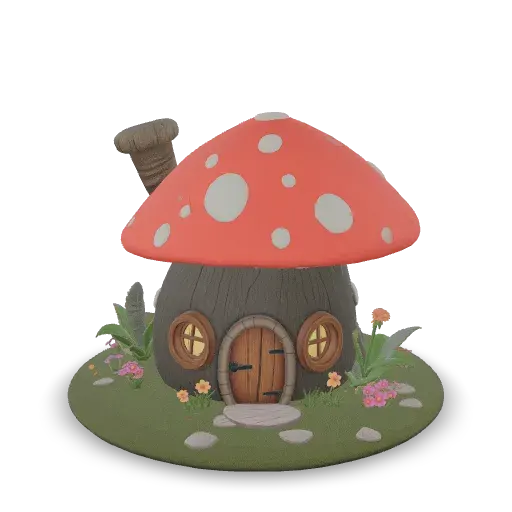
Mushroom cottage

Meshy 7.1 →
Mushroom cottage generated by Quady3D with Meshy 7.1GLB · 5.6 MB · Loads on request
Triangles
30,900
Meshes / materials
1 / 1
Rig / animation
None
Textures
1 × 2K

One 2K color texture; no normal or metallic-roughness maps.

Inspect the base, small flowers and back wall. This single mesh has no separate door, collider or LOD chain.

Original prompt

A cozy fantasy mushroom cottage with a red spotted cap roof, round wooden door, small windows with glowing lights, a tiny chimney and a flower garden around the base

Remesh on · Target 30,000 · PBR off
Use this prompt in the workspace →

Download original GLB ↗
Text to 3D

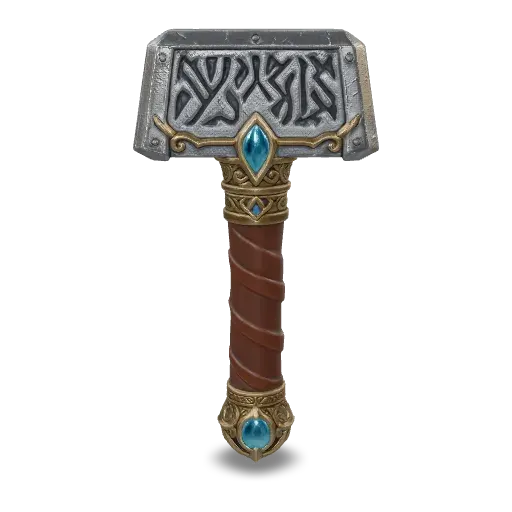
Runic war hammer

Rodin Gen-2.5 →
Runic war hammer generated by Quady3D with Rodin Gen-2.5GLB · 13.3 MB · Loads on request
Triangles
35,586
Meshes / materials
1 / 1
Rig / animation
None
Textures
3 × 2K

Three 2K textures: color, normal and packed metallic-roughness.

Check the grip and head silhouette at gameplay distance. This is one static mesh, without a character rig or gameplay attachments.

Original prompt

An ornate fantasy war hammer with a runic engraved steel head, gold filigree, wrapped leather grip and a glowing blue gem in the pommel, high-detail game asset

Gen-2.5 Medium · 18K Quad setting · All materials

Use this prompt in the workspace →

Download original GLB ↗
Before publishing

Check the asset in your game engine

Scale

Compare the model with a known object or character.

Materials

Check how the surface looks under engine lighting.

Performance

Test it in a representative scene on the target device.

Questions

Frequently Asked Questions

Can I create a game asset from text or an image?

Yes. Describe one prop or character with text, or use Image to 3D when you already have concept art.

Is the generated model ready to put in a game?

Use it as a draft. Check its scale, materials, collisions, and performance in your game engine before publishing.

What file format can I download?

The saved examples on this page are available as GLB files. The files returned by a new generation depend on the model you choose.

Can I use the model in Unity, Unreal Engine, or Godot?

Yes. Import the downloaded model with the engine's supported 3D import workflow, then check its scale and materials in a test scene.