














01
Shape
The estimated surface becomes a mesh. Its polygon layout, holes, and thin parts may need repair.
Updated September 2026
Image-to-3D AI reads the shape and appearance visible in a picture, then predicts a 3D form for the parts the camera cannot see. It builds a model you can rotate, but the hidden surfaces and real-world size are estimates—not measurements.

Compare three images with the 3D models Quady3D generated from them. Each pair makes the visible clues and hidden-side guesses easier to see.
Tripo H3.1

The front outline, face, arms, color, and fur are visible. The back and exact thickness are not.
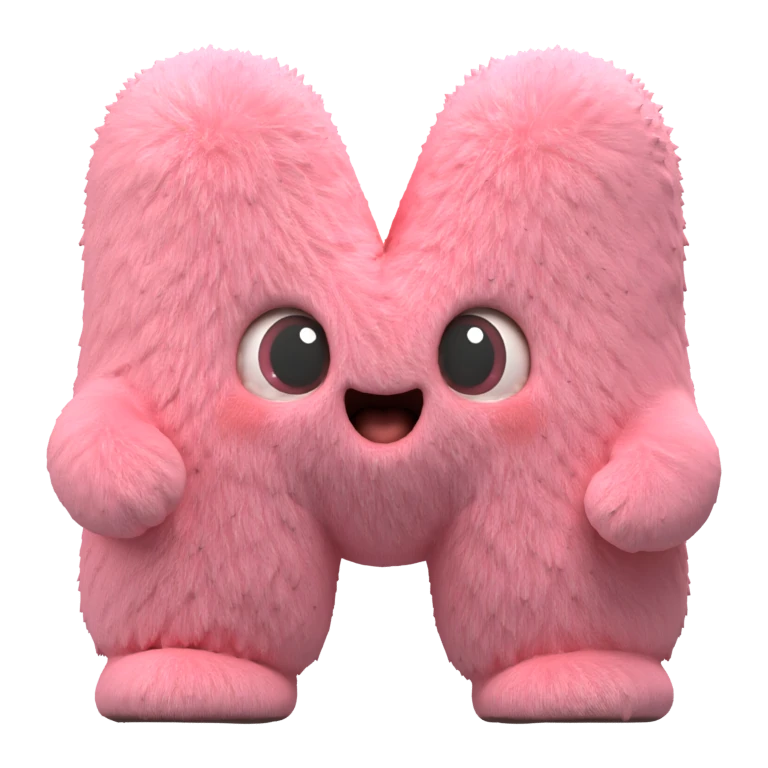
Rotate the result to inspect the inferred back and side shape. Fur and face details can change from the input. The result is not a 3D scan.
Upload an image, choose a model, and review the live credit cost before generating.
A single picture supplies a silhouette, colors, shading, and clues about which visible parts overlap. Those cues suggest depth, but they do not reveal exact thickness, the back, or physical dimensions. In the Quady example above, the face is visible; the back is not.
A mesh is a surface made of connected polygons. The model can then receive color or a generated texture, often through UV mapping. Geometry and appearance are separate: a convincing front view does not guarantee clean topology, texture seams, or a usable back.
The estimated surface becomes a mesh. Its polygon layout, holes, and thin parts may need repair.
Color and texture are added to the surface. Check for stretching and seams as you rotate it.
Export formats and texture maps depend on the chosen model and the files returned by that job.
More views can constrain the hidden shape, but the right method depends on whether you want a quick draft or a reconstruction of a real object.
A fast draft from one clear angle. The hidden side has the most uncertainty.
Consistent front, side, and back images provide more evidence about shape and details.
Try multi-image to 3DMany overlapping photos reconstruct a real subject from observed views. It is a different workflow from generative image-to-3D.
These terms describe different ways to represent a 3D result. The Quady3D workspace here returns the files supplied by the selected mesh-generation model; it does not promise a NeRF or Gaussian splat export.
Connected surface polygons that you can inspect, edit, and export when the job returns a model file.
A neural representation designed to render a scene from new camera views, not an ordinary editable mesh.
A collection of 3D appearance elements for view synthesis, also different from a standard mesh.
Rotate the model rather than judging only the front preview. Compare the visible side with the source, then inspect the inferred back, thin parts, openings, texture seams, and scale. A draft can look good in one view while still needing cleanup for a game, print, or product workflow.
Choose the next step for your question: follow a practical tutorial, use the generator, add more views, or compare models.
Prepare an image, generate a draft, inspect it, and export the result.
Read the image-to-3D tutorialUse the full image-to-3D tool and compare models and example results.
Explore the image-to-3D toolGive the model several consistent views to reduce hidden-side uncertainty.
Try multi-image to 3DCompare Quady3D inputs with their 3D results across image, text, sketch, and multi-view workflows.
Browse AI 3D examplesNo. With one image, the back is not visible. The model predicts a plausible shape based on the visible front and learned patterns, so rotate the result and check it.
No. A single-image result is inferred geometry, not a measurement of the subject. Check dimensions and rebuild precise parts when accuracy matters.
No. Geometry defines the surface; texture defines its appearance. A model can have convincing color while still having holes, soft details, or awkward topology.
Consistent front, side, and back views can show details a single image hides. They reduce ambiguity, though the model may still infer some surfaces.
If the job returns a mesh file, you can inspect it and use a compatible 3D tool for editing. The available files and amount of cleanup depend on the selected model and result.