












 For Google Chrome
QUADY3D / 3D VIEWER & CONVERTER FOR CHROME
3D viewer for Chrome. Open. Inspect. Convert.
Open a local model from your browser toolbar. Inspect it, convert a static mesh or save a snapshot, without uploading your local file or creating an account.
KEEP YOUR WORK MOVING
A useful next step for your model.
Open and inspect
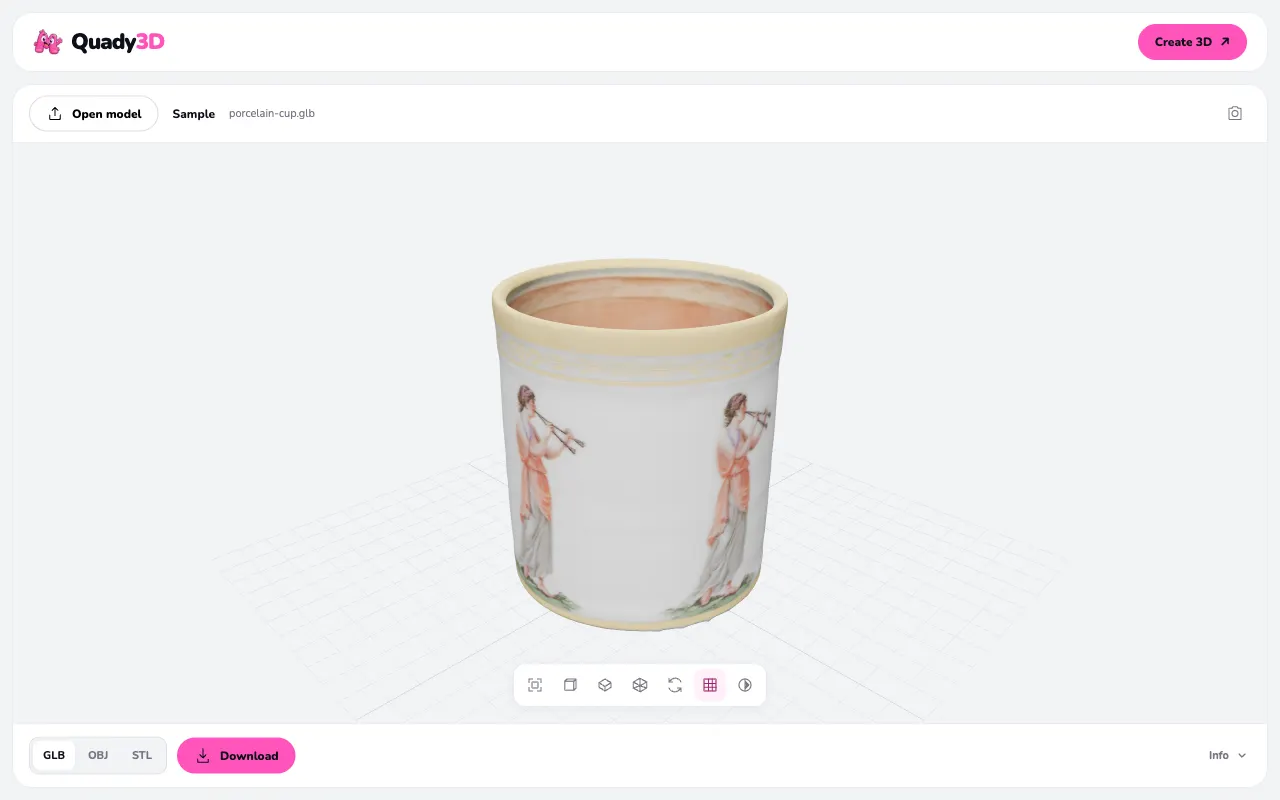
View local GLB, self-contained glTF, OBJ and STL. Orbit, zoom, inspect counts and use wireframe.
Convert static meshes
Export GLB, geometry-only OBJ or binary STL. Save a PNG snapshot of the current view.
Choose your site access
Preview a direct model link from its context menu. Site access is requested for that origin when you choose to load it.
FROM DOWNLOAD TO YOUR WORKSPACE
Set up. Connect. Keep creating.
Follow the steps for this tool. Your source files, application and account settings stay under your control.
Get it from Chrome Web Store- 01
Install from the official store
Open the Quady3D Chrome Web Store listing and choose your browser’s install action. Review its permissions before confirming.
- 02
Open a local file
Pin the extension if you want a toolbar shortcut. Open its popup and select a supported local model, or try the bundled sample.
- 03
Inspect in the workspace
Rotate and fit the view, switch to wireframe or inspect mesh information. Expand to a full tab for a longer session; closing the popup clears its workspace.
- 04
Export the file you need
Choose GLB, OBJ or STL and download a new output, or save a PNG snapshot. Keep the original source when you need animation, rigs or other information conversion does not retain.
KNOW THE HANDOFF
The files and features you can use.
- Input formats
- GLB, embedded-resource glTF, OBJ, STL
- Input limits
- 50 MB · 2 million vertices/triangles
- Output
- GLB, OBJ, binary STL, PNG snapshot
- Local tools
- Free · no account required
Before you continue
- GLB and glTF must embed their resources. Draco, Meshopt and KTX2 compressed assets are not supported by this version.
- OBJ loads geometry without separate MTL or textures. OBJ and STL exports contain geometry only.
- Conversion exports static meshes and does not preserve animation, rigs or morph targets. Camera fitting does not change the source scale.
- Local files stay on your device. Opening a selected remote model sends a request to that source; visiting Quady3D opens the separate website and its account or credit-based services.
A FEW USEFUL DETAILS
Before you connect.
Is this an online viewer or a Chrome extension?
This page installs the browser extension. Quady3D also has web viewers if you prefer opening a model without installing anything.
Why is a model link asking for permission?
The extension asks for access to the selected model’s origin when you choose to load it. It does not automatically scan every page you visit. You can manage optional site access in your browser’s extension settings.
Can I use it offline?
Local file viewing and conversion work offline after installation. Loading a remote file or visiting Quady3D requires a network connection.
How do I remove it or get help?
Remove Quady3D from your browser’s extension management page. Previously downloaded files remain in your folders. The support and privacy links below explain the extension’s behavior and contact options.
CONTINUE YOUR WORKFLOW