















3D print cost calculator
Enter sliced filament weight and print time. See FDM job costs, a per-part quote and an exportable breakdown.
Enter the slicer totals for the whole job, including supports and purge. All sample rates are illustrative; use your actual costs.
2. Electricity, machine and labor
Other costs and selling fees
A real slice, with a full cost breakdown
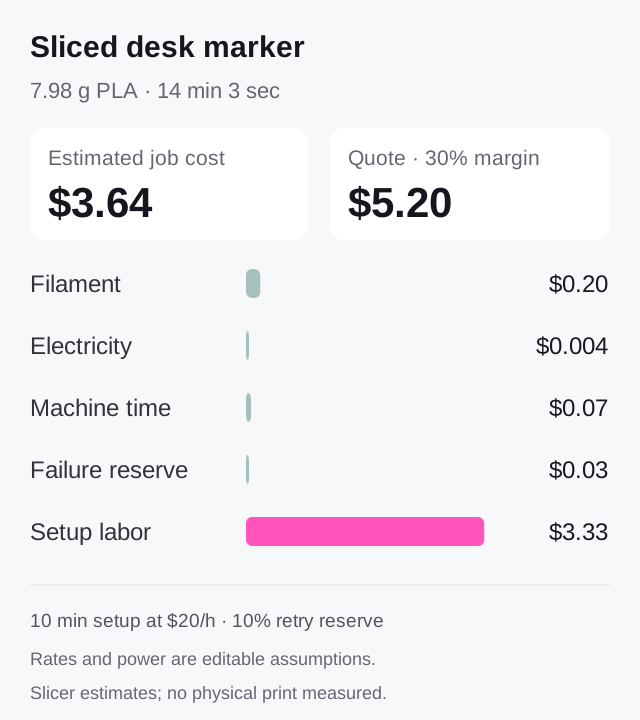
Actual slicer estimates: 7.98 g of PLA and 14 min 3 sec. Shop rates are editable assumptions.

- Slicer filament estimate
- 7.98 g
- Slicer total-time estimate
- 14 min 3 sec
- Estimated job cost
- $3.64
- Quote at 30% target margin
- $5.20
How this example was made
Recorded slicer inputs
Bambu Studio 02.08.02.61 sliced the original project into 120 layers using one PLA filament. Its G-code header and slice report agree on 7.98 g and 843 seconds. These are estimates for that printer and process, not measurements from a physical print.
Editable pricing assumptions
This example uses $25/kg filament, 120 W average power, $0.15/kWh, $0.30 per machine hour and 10 minutes of setup at $20/hour. With a 10% full-job failure allowance, no selling fees and a 30% target margin, material is $0.20, total cost $3.64 and the quote $5.20. Load the sliced case in the calculator to change any rate.
Model by Quady3D AI, CC0. Actual local slicing; no physical print or measured electricity use is claimed. All rates are editable example assumptions.
One setup, more finished parts
Keep the recorded slice totals per part and spread one setup across the job.
Illustration using the desk-marker case rates. Grams and print hours multiply by quantity; setup is charged once. A real batch can slice differently. Change the main calculator’s job totals for your actual plate.
How to use the 3D printing cost calculator
Copy slicer totals
Enter full-job grams, including supports and purge, plus print time and quantity.
Set your rates
Add material, electricity, machine and labor rates, failure allowance and margin.
Review and export
Compare cost with your quote, then download inputs and results as CSV.
From filament cost to a selling price
Filament cost calculator
Material cost = grams ÷ 1,000 × price per kg. The full estimate adds electricity, machine time, labor and failed-job allowance.
3D printing price calculator
The quote covers cost, your target profit margin and selling fees. A 30% margin differs from adding 30% to cost.
Use actual slicer totals. An STL alone cannot predict infill, supports or printer time. Rates and power consumption remain your assumptions.
Pricing formula, batch quantities and estimate assumptions
Quote = (job cost + fixed selling fee) ÷ (1 − margin − percentage fee), with percentages as fractions. The calculator rounds per-part quotes upward to a cent and shows achieved margin.
For batches, enter the whole batch’s grams and print time. Quantity divides the job among finished parts. Setup labor is charged once; finishing labor is per part. A 750 g spool’s price divided by 0.75 gives its price per kg.
Inspect your mesh in the STL viewer or 3MF viewer, then follow the printing preparation workflow. For file preparation, package STL parts or extract an STL.
See Prusa’s printing price calculator for context on weight, time and pricing inputs.
3D printing cost and price questions
How do I calculate the cost of a 3D print?
Start with the whole job's filament weight and printer hours from your slicer. Include supports and purge in the weight. Enter your filament price, power and electricity rate, machine allowance, labor and other costs. The calculator adds an expected failure reserve and shows total job cost, cost per finished part and a separate quoted price.
How does the filament cost calculator work?
Material cost is grams divided by 1,000, multiplied by price per kilogram. A 50 g job using filament priced at 25 per kg costs 1.25 in material, before electricity, machine time or labor. For a 750 g spool, divide its price by 0.75 to get the price per kg. Do not count supports or purge twice if they are already in your slicer total.
Is profit margin the same as markup?
No. Margin divides profit by selling price; markup divides the added amount by cost. A job costing 10 needs a selling price of about 14.29 for a 30% margin with no selling fees. Adding a 30% markup instead gives 13 and a margin of about 23.08%. This calculator solves for margin after the entered selling fees.
How does quantity affect the calculation?
Weight and printer hours describe the entire job, not one item. Quantity divides those totals into a cost and price per finished part; it does not multiply material or machine time again. Setup labor is charged once. Finishing minutes are per finished part. Update the whole-job weight and time when the print batch changes.
More questions (6)
How are failed prints included?
The reserve uses repeatable print cost times failure rate divided by success rate. Repeatable cost includes filament, electricity and machine time. The model assumes each failed full-job attempt uses a full job's print-side resources; setup, finishing and other costs are added once. Use your own failure records, particularly if failures usually happen early or affect only one part.
What should I enter for printer power and machine cost?
Use measured average power in watts when available, rather than the power supply's maximum rating. Electricity cost is kilowatt-hours times your electricity rate. Machine cost per hour is your own allowance for depreciation and maintenance; one approach is printer and maintenance costs divided by productive service hours. Avoid including electricity twice if your machine rate already covers it.
Can I upload an STL to get an automatic print price?
This calculator uses your slicer totals rather than estimating them from an uploaded STL. An STL surface does not specify infill, walls, supports, purge, printer speeds or print time. Inspect the model, slice it with the intended settings, and use the resulting total weight and time here. A model's solid volume is not the same as its filament use.
Are selling fees, shipping and tax included?
Percentage and fixed selling fees are optional inputs in Other costs and selling fees. Job-level packaging or delivery costs you pay can be entered as other costs. Tax and customer shipping charges are not added automatically. Per-part quoted prices round upward to cents; the achieved margin shows the result after that rounding.
Does changing currency convert my prices?
No. USD, EUR, GBP and CNY are display and accounting units for the entered prices. Changing the selected currency does not fetch exchange rates or convert any amount. Enter every rate and cost in the same currency.
Is this free, and can I export the result?
Yes. The calculation runs in your browser with no account or generation credits. Download estimate CSV includes your inputs, cost breakdown, quote, profit and assumptions. Invalid inputs remove the result and export until corrected. The scope is FDM filament printing; resin volume and resin post-processing are not modeled.